#SSE #Streaming #ServerSentEvents
Review
- 2023-08-15 07:37
[!Summary] 整体方案
- EventSource +
'Content-Type': 'text/event-stream'- Fetch +
'Transfer-Encoding': 'chunked',
一、Introduction #
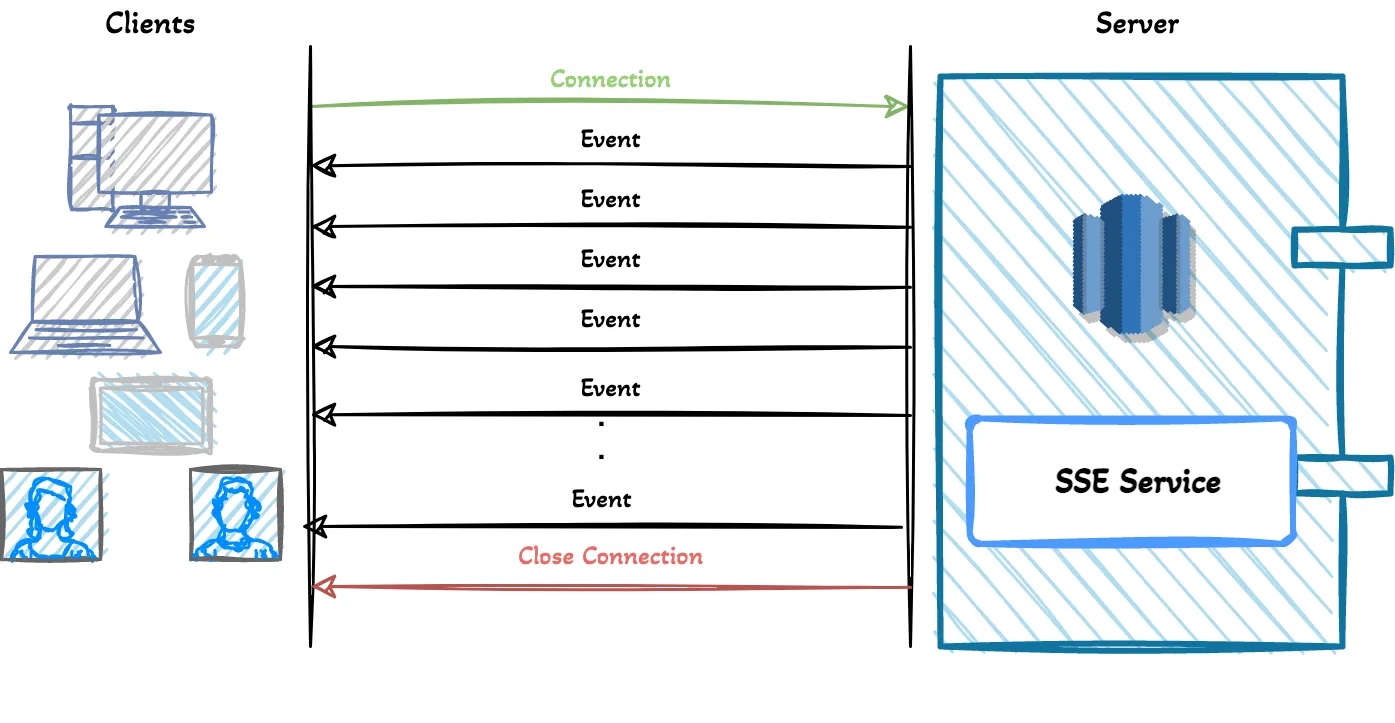
Server-Sent Events (SSE) is a technology used to enable a web server to send data to a client automatically, without the need for the client to continuously send requests for new data. This allows for real-time updates to be sent to the client, making it useful for applications that require frequent updates, such as social media feeds or stock tickers. SSE works by establishing a persistent connection between the server and client, and the server can then send data to the client as soon as it becomes available. SSE is supported by most modern web browsers and can be implemented using JavaScript on the client-side and a server-side technology such as NodeJS or PHP.
Diff #
Perform server-to-client updates techs: Client polling, Web Socket, Server-Sent Events (SSE).
Client Polling #
The client sends requests to the server at regular intervals for new updates. Although this technique is not used much nowadays, it can be preferred for some small-medium size projects. It is easy to implement. This technique does not provide a fully-real time system that depends on the request intervals.
In the polling technique, requests are sent and managed by the client side. Requests are sent by the client even if there is no update on the server.
Web Socket #
Websocket is a very popular technology that provides bi-directional data transfer for client and server communication on real-time applications. Websocket is not based on HTTP protocol, so it requires additional installation and integrations to use it. It is difficult to implement compared to other technologies that were mentioned above.
二、Quick Start #
Client #
use EventSource
EventSource
[!SUCCESS] 总结 EventSource, also known as Server-Sent Events (SSE), is a web API for receiving push notifications from a server over HTTP connections.
- 仅支持 GET 请求
- EventSource 使用 HTTP1.x,受限于 6 个connection
- 可以使用
Fetch API+Stream('Transfer-Encoding': 'chunked')模拟实现客户端 SSE 行为,本身不支持SSE (res.body.getReader,new TextDecoder)
[!error] Important Warning: When not used over HTTP/2, SSE suffers from a limitation to the maximum number of open connections, which can be specially painful when opening various tabs as the limit is per browser and set to a very low number (6). The issue has been marked as “Won’t fix” in Chrome and Firefox. This limit is per browser + domain, so that means that you can open 6 SSE connections across all of the tabs to
www.example1.comand another 6 SSE connections towww.example2.com. When using HTTP/2, the maximum number of simultaneous HTTP streams is negotiated between the server and the client (defaults to 100).
<!DOCTYPE html>
<html>

<head>
    <meta charset="utf-8" />
    <title>NodeJS SSE Demo</title>
</head>

<body>
    <h1>Hello world!</h1>
    <h2>Tip: Check your console</h2>

    <script>
        console.log("Hello World!");

        function request() {
            const evtSource = new EventSource('http://localhost:3030/sse', {
                withCredentials: true
            });

            evtSource.addEventListener('open', (event) => {
                console.log('EventSource onopen-----', event);
            })

            evtSource.addEventListener('message', (event) => {
                console.log('EventSource onmessage-----', event);
            })

            evtSource.addEventListener('error', (err) => {
                console.error("EventSource failed:", err);
            })

            setTimeout(() => {
                evtSource.close();
            }, 10000);

        }

        console.log('loaded!!!')
        request();

    </script>
</body>

</html>
Server #
const express = require('express');
const cors = require('cors')
const app = express();

app.use(cors({
  origin: 'http://localhost:3050',
  credentials: true,
}))

app.get('/sse', (req, res, next) => {
  const headers = {
    'Content-Type': 'text/event-stream',
    'Connection': 'keep-alive',
    'Cache-Control': 'no-cache'
  };

  res.writeHead(200, headers);

  const interval = setInterval(() => {
    console.log('send data')

    // 通用message类型
    res.write(`data: ${Date.now()};\n\n`)

    // 自定义Event, id,event,retry,data
    const eventData = { message: 'Hello, world!' };
    const event = `id: 10\nretry: 3000\nevent: custom-event\ndata: ${JSON.stringify(eventData)}\n\n`;
    res.write(event);

  }, 1000);

  req.on('close', () => {
    console.log('Connection closed');
    clearInterval(interval)
  })
});

app.listen(3030, () => {
  console.log('server ok')
})
[!Important] 重要响应头配置
Accept: text/event-streamindicates the client waiting for event stream from the server.Cache-Control: no-cacheindicates that disabling the caching.Connection: keep-aliveindicates the persistent connection.
This request will give us an open connection which we are going to use to fetch updates. After the connection, the server can send messages when the events are ready to send by the server. The important thing is that events are text messages in UTF-8 encoding.
三、适用场景 #
- E-commerce Projects (notify whenever the user needs the information)
- Tracking system
- Alarm/Alert Projects
- IoT Projects (Alarm, notify, events, rules, actions)
- Stock Markets (Bitcoin etc.)
- Breaking news, Sports Score Updates
- Delivery projects
- In-app notifications
- …
In short, SSE can be used in all web applications where users need real-near time information.