#Archive
Review
- 2019-09-10
- 2023-02-12 18:10
- 2024-07-29
[!Summary] 简单点,就是一个普通的 JavaScript 对象(ReactElement),包含了 tag、props、children 三个属性。运行时通过执行
React.createElement()或者jsx()获取到 VDOM,详见 [[0x21-React JSX Transform]]VDOM优点
- 体积更小,内存开销低:原生DOM有大量的属性
- 描述UI的能力更强大:因为不支持AOT,语法不受限
- 多平台支持:可以对接不同的宿主环境(Dom, Native, Art)
The virtual DOM (VDOM) is a programming concept where an ideal, or “virtual”, representation of a UI is kept in memory and synced with the “real” DOM by a library such as ReactDOM. This process is called reconciliation.
This approach enables the declarative API of React: You tell React what state you want the UI to be in, and it makes sure the DOM matches that state. This abstracts out the attribute manipulation, event handling, and manual DOM updating that you would otherwise have to use to build your app.
Since “virtual DOM” is more of a pattern than a specific technology, people sometimes say it to mean different things. In React world, the term “virtual DOM” is usually associated with React elements since they are the objects representing the user interface. React, however, also uses internal objects called “fibers” to hold additional information about the component tree. They may also be considered a part of “virtual DOM” implementation in React.
下面内容有待确认准确性
虚拟 DOM 提升性能的点在于 DOM 发生变化的时候,通过 diff 算法比对 JavaScript 原生对象,计算出需要变更的 DOM,然后只对变化的 DOM 进行操作,而不是更新整个视图。
很多人认为虚拟 DOM 最大的优势是 diff 算法,减少 JavaScript 操作真实 DOM 的带来的性能消耗。虽然这一个虚拟 DOM 带来的一个优势,但并不是全部。虚拟 DOM 最大的优势在于抽象了原本的渲染过程,实现了跨平台的能力,而不仅仅局限于浏览器的 DOM,可以是Android和 iOS 的原生组件,可以是小程序,也可以是各种GUI。
Virtual DOM works in this steps:
- Whenever any underlying data changes, new virtual DOM representation will be created.
- Then the difference between the previous DOM representation and the new one is calculated.
- Once the calculations are done, the real DOM will be updated with only the things that have actually changed.
一、Introduction #
This article aims to clarify how the virtual DOM is actually implemented in React.
As we know, the DOM is a tree-like structure that is used to represent a web page. It provides an interface through which developers can perform certain operations on that page, such as fetching information and altering the content/structure. However, operating directly on the DOM is something that shouldn’t be done more often than actually required because it is a slow process. Even accessing some element’s properties, such as offsetHeight, would result in a browser reflow, which is can be computationally expensive.
So, operations on the DOM should be done when needed and efficiently. This is where the virtual DOM comes into play. The virtual DOM is also tree-like structure, kept in memory, that stores the elements of a page, but it comes with the benefit that performing any work on is cheaper and faster, compared to its counterpart. It is the virtual DOM that takes on the responsibility of determining what has changed in terms of content/structure and then ==all the modifications are committed on the actual DOM at once==.
At its core, the virtual DOM is just a tree of so-called FiberNodes(we will refer to it as FiberTree). As we will see, these nodes are just JavaScript objects with some properties that are very cleverly leveraged.
In the next section, as another small introductory step, we will see what a FiberNode is about.
Becoming familiar with what a FiberNode is #
Since the FiberTree is built from the compiled JSX, we could say that there is a FiberNode for each
React element. Although this is not always true(e.g. certain elements can lead to more FiberNodes being created), we will stick to this principle for now because it won’t impede( [/ɪmˈpiːd/] 阻止) our understanding process.
So, from the following JSX snippet:
function App () {
  return (
    <article>
      <h2>Title</h2>

      <p>Some content</p>
    </article>
  )
}
we’d end up with 4 FiberNodes, one for each of the following: the App function component, the <article> tag, the <h2> tag and the <p> tag. There is also a root FiberNode, but it is not relevant now.
The relationships between the React elements persist when it comes to FiberNodes. For instance, we could intuitively( [/in’tju:itivli/] 直观的) say that the App‘s FiberNode will be the parent of the <article>‘s FiberNode. As far as the <h2> and <p> tags are concerned, there is no parent-child relationship, but a sibling relationship.
In the above paragraph we’ve already listed some of the most important FiberNode’s properties:
child:AppFiberNode.child === ArticleFiberNodesibling:H2FiberNode.sibling === PFiberNodereturn: arguably([/‘ɑːɡjʊəblɪ/]可以说), this might be the least intuitive, but it can be thought of as the parentFiberNode-H2FiberNode.return === ArticleFiberNodeand alsoPFiberNode.return === ArticleFiberNode(so, all the siblings have a reference to their parentFiberNode); an explanation as to why it is calledreturninstead ofparentcan be found in this document written by Andrew Clark; for the rest of the article, we will usereturnandparentinterchangeably
This would be a plain visualization of the above FiberTree:
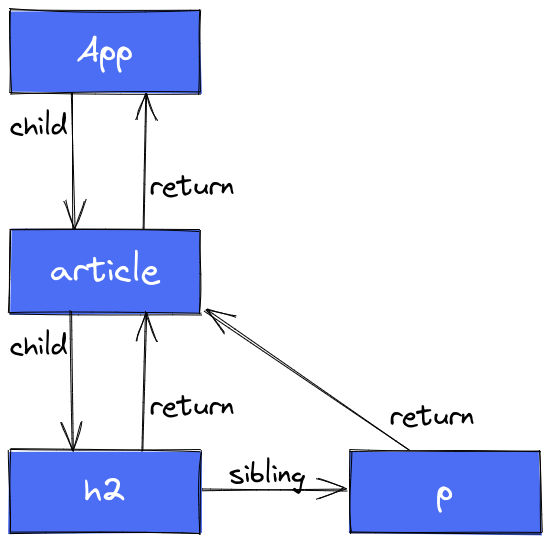
The link for the above diagram can be found here.
However, recall that the virtual DOM is responsible for determining what’s changed and also for collecting the changes so that they can be committed all at once so that the browser can render the new content. For now, all we have is a way to organize the React elements based on the relationships between them. But we need more than that, we also need a way to tell whether changes(of any kind) have occurred or not within a FiberNode. Therefore, we will have to introduce another powerful property of the FiberNode, which is vital for the
render phase: alternate.
Firstly, let’s state once again the problem that is to be solved: how to determine the changes that have been made in a FiberNode? Suppose there is a React element that displays a counter’s value:
<p>{counter}</p>we need to find a way to not miss any updates on the counter value. Keep in mind that, in order to find any modifications, we will have to traverse the FiberTree. Imagine the FiberNode of the above element is now being visited, how would one be able to tell that something has changed?
We need something to compare against and this is where the alternate property plays an important role. In this case, where we want to discover any updates, alternate will refer to the previous state of a FiberNode. Yes, an alternate property of a FiberNode will also point to a FiberNode! It’s like having 2 copies of the same FiberNode, one which stores the value that is, at this moment, visible in the browser, while the other stores the new changes that have to be reflected in the browser. So, we can determine whether there is something to commit later on if the state of the previous FiberNode differs from the state of the newly updated FiberNode.
There is a formal way to define the alternate property’s usefulness and we will do this in the next section, by going into detail about the two possible states of a FiberNode: current(the state that is now reflected in the browser) and workInProgress(the state that is to be reflected in the browser).
The current and workInProgress states of a FiberNode #
Let’s restate the purpose of these 2 states of a single FiberNode: we need to find and collect all the changes that have occurred in the tree so that all the necessary updates will be incurred by the real DOM at once/in a single batch. The way to find a change in the FiberTree is by comparing what’s currently being shown on the screen(i.e. the current FiberNode) with what will be shown on the screen(i.e. the workInProgress FiberNode).
In the diagrams that will follow we will include both the current and the workInProgress FiberNodes for a single React element. For instance, this is how an <article> tag will be illustrated:
![[e7dc0aab4c7c_5eee0cde.png]]
In the image above, there are 2 FiberNodes that correspond to an article element: current and workInProgress(abbreviated as WIP). One can access its counterpart via the alternate property:
// `workInProgress === current.alternate` // true
// `workInProgress.alternate === current` // true
current === current.alternate.alternate // true
Before moving on, let’s find a possible answer to another interesting question: why is this property called alternate? My take on this is that these 2 FiberNodes, current and workInProgress, continuously alternate across browser renderings. Suppose there is a Counter component rendered in the browser with the value 10. If the Increment button is clicked, then the 2 FiberNodes associated with the Counter component will look like this:
current- has the value of10, because it is what’s currently being shown in the browserworkInProgress- has the value of11, because it contains the change that has to be performed
After comparing current’s state with workInProgress’ state, a modification has been discovered(going from 10 to 11) and it will eventually be reflected in the browser. After this happens, it is expected for the barely resolved workInProgress to become current. That’s because if the user clicks on the Increment button once again, then the same logic will be applied and current will have the value of 11(the value of the old workInProgress), whereas the new value of workInProgress will be 12. As you can probably anticipate, the alternation goes on and on: when some work has to be done on the FiberTree, current reflects the current state visible in the browser, then, after the changes have been applied to the DOM, workInProgress becomes current.
The next section is meant to clarify these concepts even further with the help of some diagrams.
A hands-on example to grasp the FiberTree #
All the diagrams used in this section can be found in this Excalidraw workspace.
This section aims at illustrating how the virtual DOM(and thus the FiberTree) works, with the help of a simple application and some comprehensive diagrams.
This the demo application that we will follow:
// index.tsx
function App() {
  return (
    <div>
      <h2><i>Welcome world!</i></h2>

      <Counter />
    </div>
  );
}

// Counter.tsx
export default function Counter() {
  const [count, setCount] = useState(0);

  return (
    <div className="counter">
      <button onClick={() => setCount(count + 1)}>Increment</button>

      <p>The value is: {count}</p>
    </div>
  );
}
Assuming the count’s value is 7, this is what the FiberTree would look like:
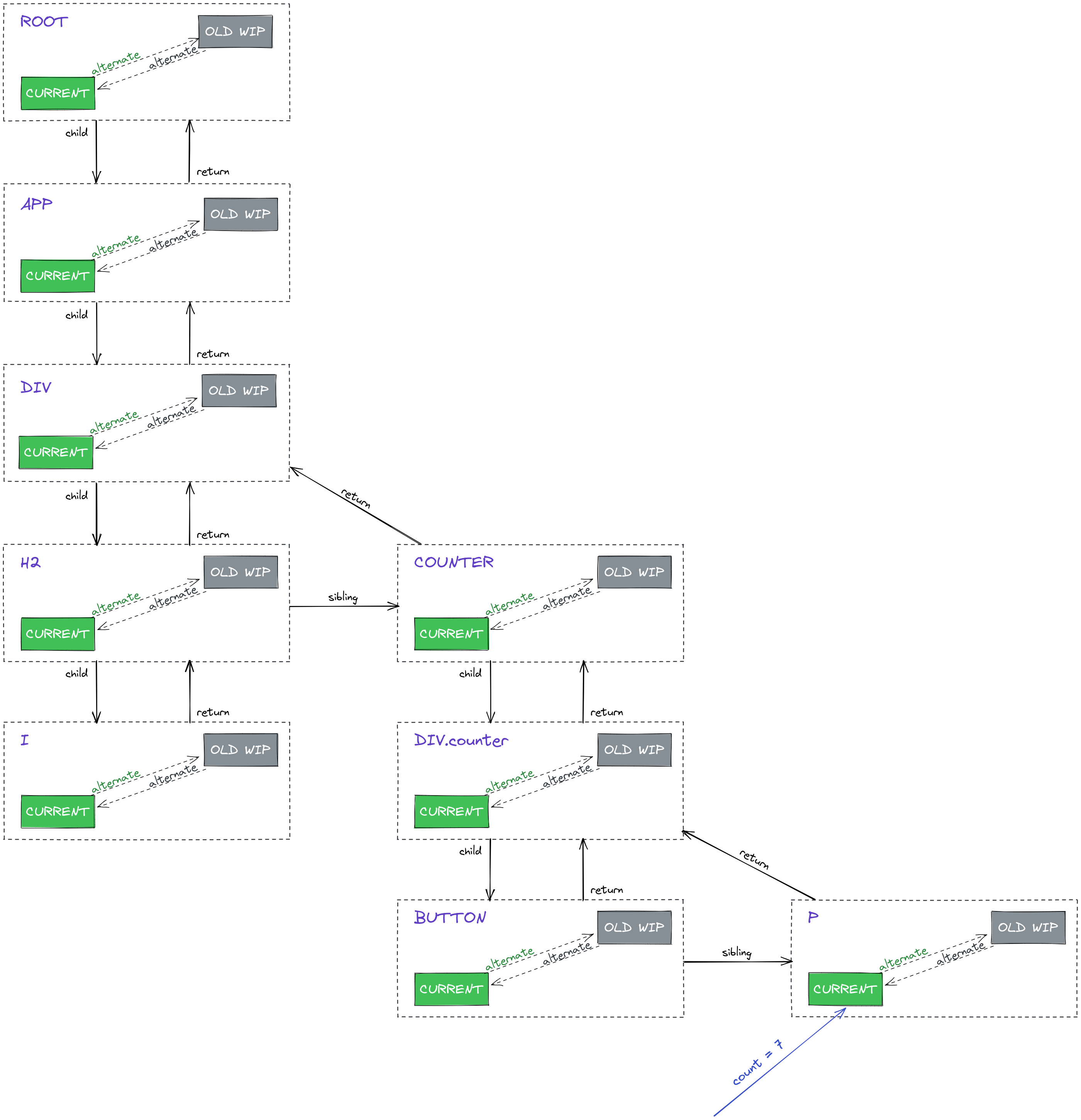
It is implied that the relationships indicated by the arrows(e.g. child, parent, sibling) apply on FiberNodes of the same type(i.e. a current FiberNode is a child of another current FiberNode, not workInProgress).
Notice the old workInProgress FiberNodes(highlighted in grey and abbreviated as OLD WIP) - what it is saying is that, prior to what’s currently being shown in the browser, the count’s value was 6 and the new workInProgress came with the value of 7. Then, workInProgress became the current current. As a result, in the situation depicted by the above diagram, current === OLD_WIP is true. OLD WIP doesn’t do anything per se, it’s just a placeholder for a potential workInProgress FiberNode that may come with a new value.
Now, let’s see what happens if the Increment button is clicked. Firstly, an event will be triggered as a result of pressing the button and then the useState‘s dispatcher(i.e. the setCount() function) will be invoked. This event signals that some synchronization work needs to be done on the FiberTree. It is called synchronization because the current tree needs to take in the changes carried by the workInProgress tree, so that in the end the results are visible in the browser.
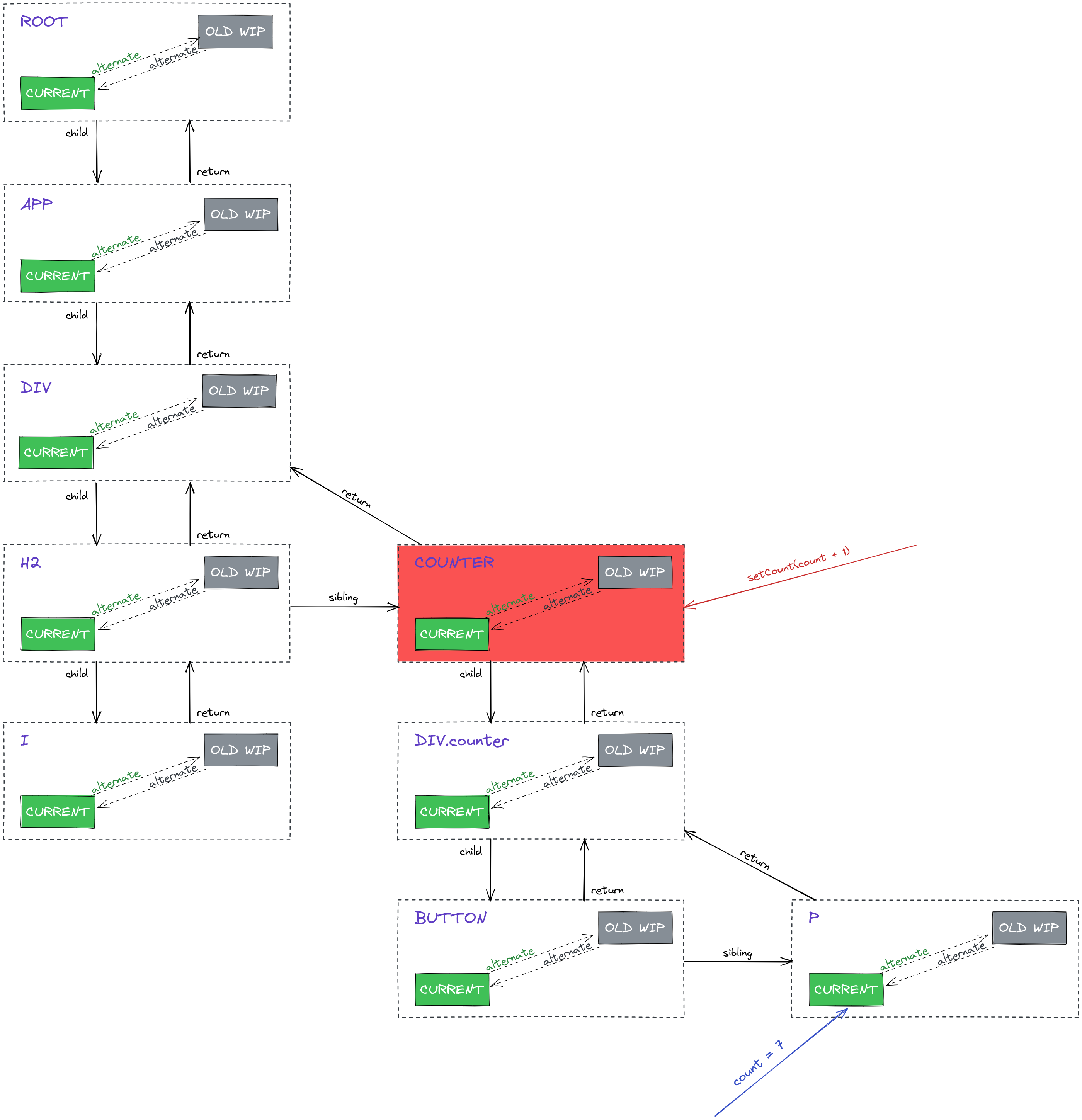
The Counter has been highlighted in red because it’s where the useState hook has been used. It’s also the topmost node that would be affected by a state change(since it holds the state), so any updates could affect only the state of its children elements(e.g. the p element which displays the count’s value). Put differently, by invoking setCount(), the Counter component becomes the cause of a re-render of the FiberTree.
What happens next is that the branch/subtree of nodes which starts from the root and includes the Counter‘s FiberNodes is marked as dirty(marked with red hachures):
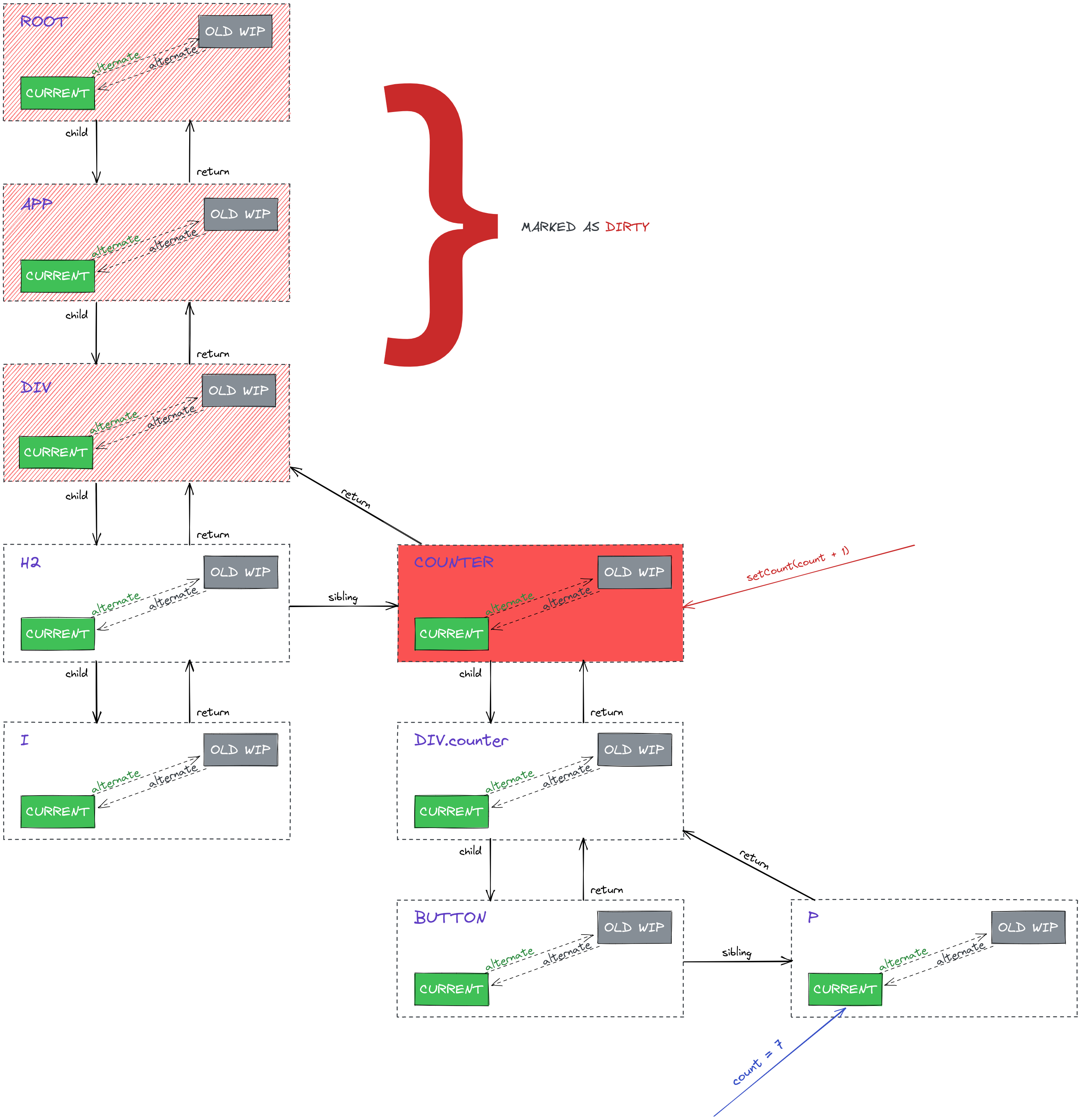
Marking those ancestor nodes as dirty indicates that something has changed somewhere down in the tree. This has further implications - by setting apart a subtree that contains modifications, we can avoid doing redundant work on branches that are not affected at all. For example, the FiberNodes associated with the <i> tag will not be influenced by the Counter’s state. Let’s see the next diagram, which underlines the presence of workInProgress nodes:
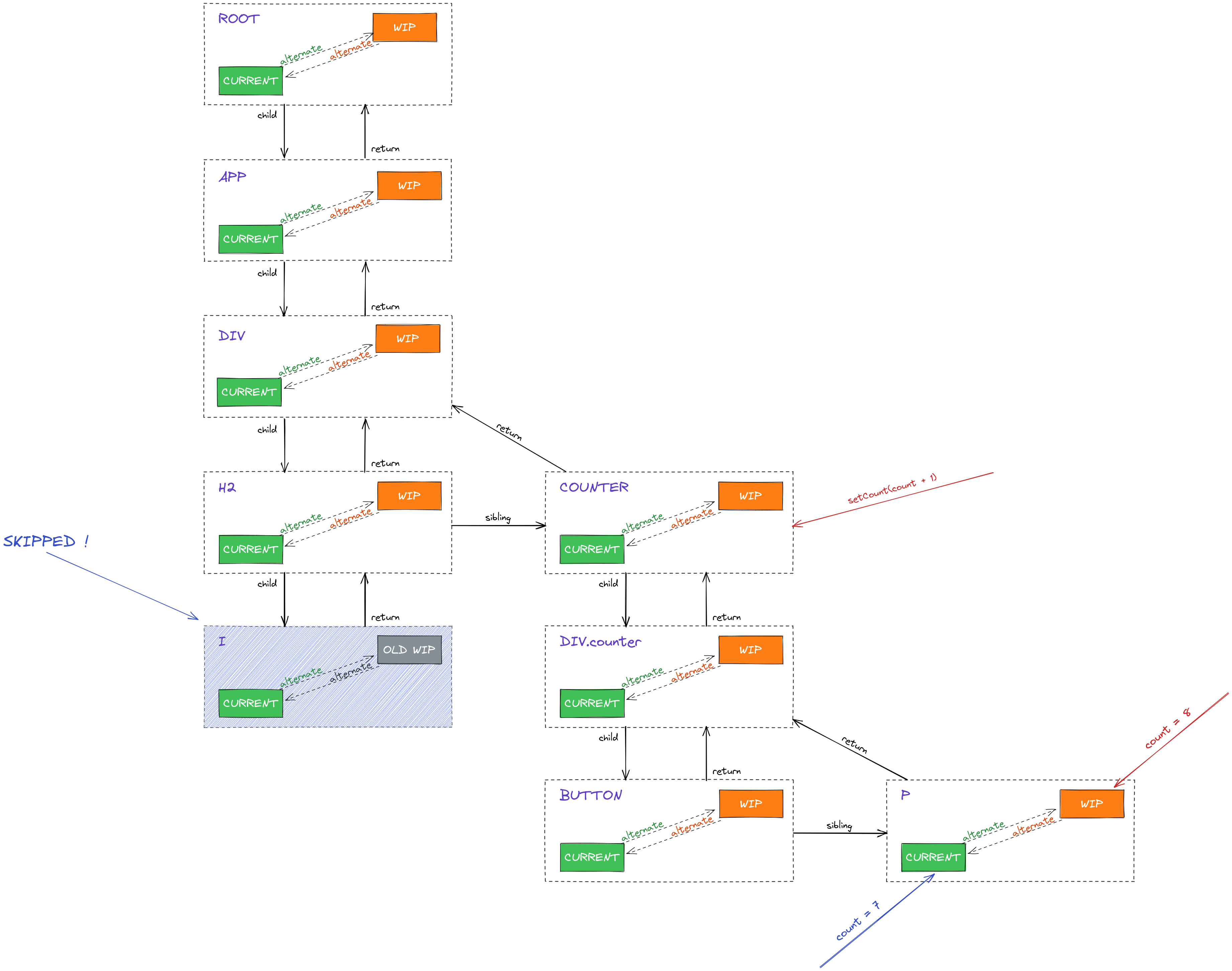
Notice how the FiberNode corresponding to the <i> tag is skipped, because the changes that occurred have no effect on it. If such FiberNode had had any children, the entire subtree would’ve been skipped. As you can see, a workInProgress node has been set for each node in the entire modified subtree(including Counter’s descendants - so modifications can be discovered). Although not every workInProgress node may bring new updates, it’s necessary to be able to identify the subtree which brought modifications. This comes handy especially during the commit phase, where all the changes will be applied to the real DOM.
Also, take note of the fact that the p‘s workInProgress node contains the most recent value of the counter, which is 8.
Now, you might be wondering why a workInProgress node has been set for h2 as well(which clearly isn’t affected at all by the Counter’s state) - the reason is that its parent, the div‘s FiberNode, is part of the subtree which contains a changes and, when this happens, a parent FiberNode will set workInProgress nodes for all its children. Concretely, the div‘s FiberNode has created a workInProgress node for each of h2 and Counter. Another way to think about this is because div‘s FiberNode is marked as dirty, it means that, somewhere among its descendants, a modification has occurred. Since it can’t know beforehand where exactly it took place, all the div's direct descendants will get a new workInProgress FiberNode. This doesn’t seem to provoke any issues, since the subtree which has h2 as root will be skipped either way.
However, if a workInProgress node has been created, it doesn’t necessarily have to bring updates. It may be just part of a branch/subtree in which updates have been made. This can be observed in the following diagram:
![[ec5a9d112eeb_0ec67268.png]]
What is shown above is the moment after the changes have been committed to the real DOM.
Let’s now go step by step and understand why each of the nodes coloured in blue brought changes:
p- it displays thecount’s value, so obviously its content has been changedbutton- it has been used like this in our component:<button onClick={() => setCount(count + 1)}>...</button>. This means that a new function will be created each time theCountercomponent renders. And since a change in the state occurred, we know for sure the component re-rendered and therefore thebuttonelement has received a new propdiv.counter- its parent node(i.e.Counter) re-rendered and its children are different(i.e. itspchild previously displayed7and now it displays8); here is a discussion that might clear up some possible confusions regarding this aspectCounter- its state(fromuseState) changed
As a side note, if there was a static element inside the
Countercomponent, like<h3>hello</h3>, it would’ve been different across re-renders ofCounter. That’s because React elements are essentially objects resulted from calling[createElement()](https://github.com/facebook/react/blob/v18.0.0/packages/react/src/ReactElement.js#L362). So, re-renderingCounterinvolves re-calling thatcreateElementand hence a new object will be returned every time.
And now, since all the changes have been committed, the FiberTree is back to its stable state:
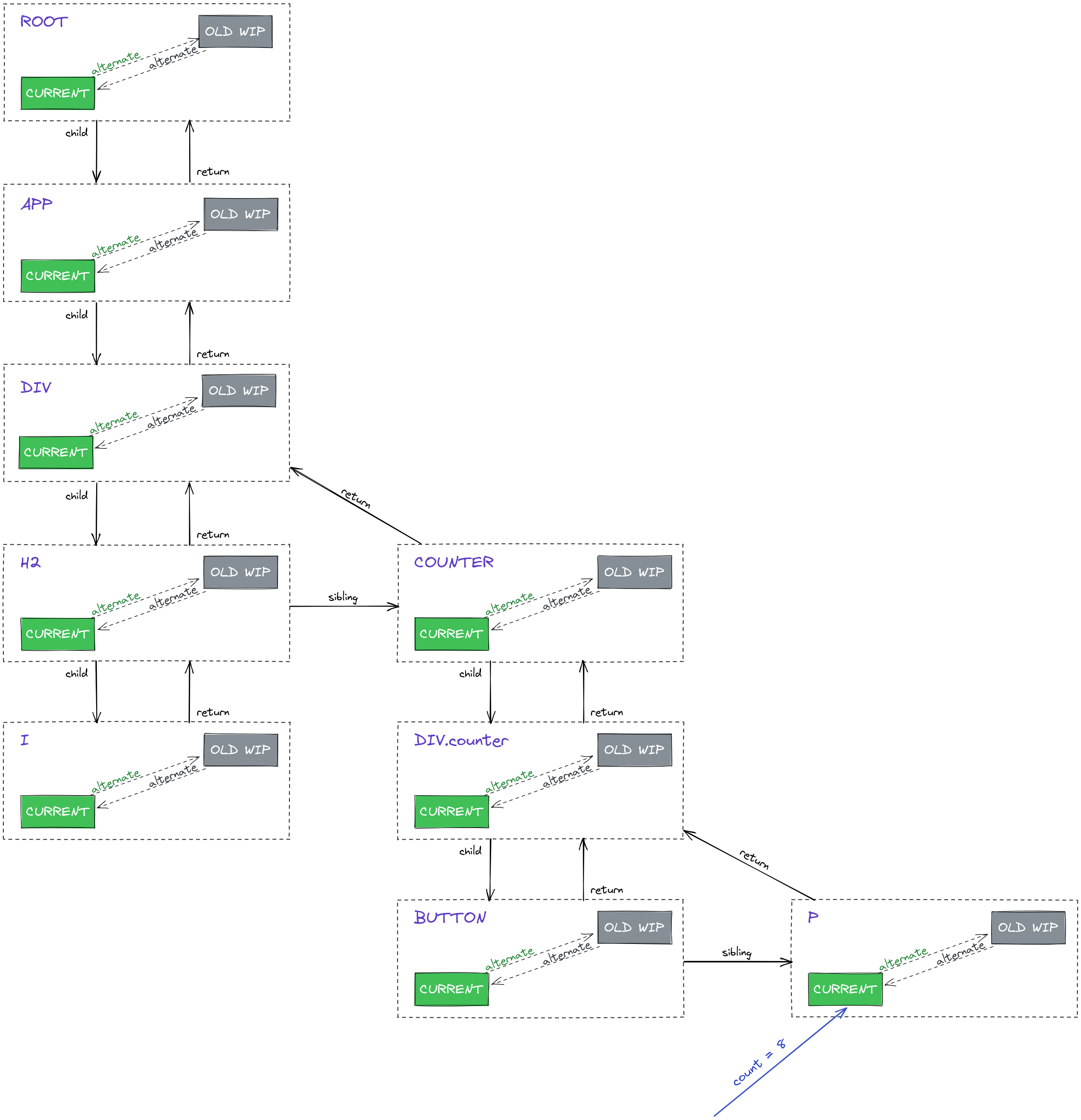
Notice how the count’s value is now 8.
As a side note, another interesting facet of the alternate property is that is allows React to keep track of 2 separate trees simultaneously. You can distinguish the current tree by following the green rectangles and the workInProgress tree by following the orange ones. What’s also worth mentioning is that these aforementioned trees don’t have to be symmetrical - one can have more or less nodes compared to the other(e.g. when elements are added/removed). We will explore such cases in upcoming articles.
Conclusion #
It would be unfair to say this article was just the tip of the iceberg, because I believe we actually covered many fundamental aspects of the React’s virtual DOM. Of course, some details have been omitted for the sake of simplicity, but I hope the bits of knowledge acquired from this writing will make you more aware of what’s going on under the hood and, why not, give you enough confidence to start exploring the source code on your own.
To do a quick recap: the main unit of React’s virtual DOM is the FiberNode. With the help of its alternate property, React can discover what changes have been made inside the application. It does that by comparing the current state(what’s visible at this moment in the browser - stored in the current tree) and the newly updated state(what’s to be shown in the browser - stored in the workInProgress tree). One current FiberNode can access its counterpart workInProgress FiberNode(and vice versa) via the alternate property. Once all changes have been discovered, they are all committed at once on the real DOM and, after that, the outcomes can be seen in the browser.