Review
- 2024-07-29 05:10
一、Introduction #
preload #
A preload directive is an html tag that tells the browser how specific resources are fetched to your current navigation. Essentially it downloads resources in the background of your current page load, before it is actually used in the current page.
You need to add the rel attribute with the preload value and add as="style" on the <link> element.
<head>
  <meta charset="utf-8" />
  <title>JS and CSS preload example</title>

  <link rel="preload" href="style.css" as="style" />
  <link rel="preload" href="main.js" as="script" />
  <link rel="preload" href="flower.avif" as="image" type="image/avif" />
  <link
    rel="preload"
    href="fonts/cicle_fina-webfont.woff2"
    as="font"
    type="font/woff2"
    crossorigin />

  <link rel="stylesheet" href="style.css" />
</head>

<body>
  <h1>bouncing balls</h1>
  <canvas></canvas>

  <script src="main.js" defer></script>
</body>
Many content types can be preloaded. The possible as attribute values are:
fetch: Resource to be accessed by a fetch or XHR request, such as an ArrayBuffer, WebAssembly binary, or JSON file.font: Font file.image: Image file.script: JavaScript file.style: CSS stylesheet.track: WebVTT file.document
According to the preload specification, when preloading fonts there is an additional attribute which must be taken into consideration.
Preload links for CORS enabled resources, such as fonts or images with a crossorigin attribute, must also include a crossorigin attribute, in order for the resource to be properly used.
Prefetch #
Prefetching a process where the browser fetches the resources required to display a specific page that the consumer is likely to get in its second click. In other words, the browser loads a page that you’re probably going to visit in the future. The browser can store these resource in its own local cache, to send the requested information quicker if the user does end up visiting that page.
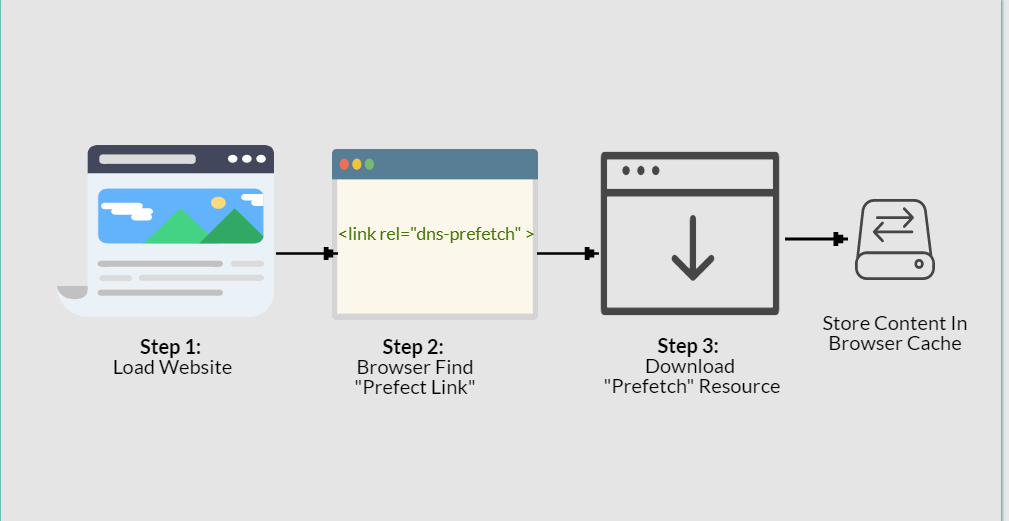
Once a webpage has completed loading and the idle period has now passed, the browser starts downloading the next prefetched page. After a person clicks on a specific link which has already been prefetched, they’ll observe the content immediately.
There are two different types of prefetch.
- Link Prefetching
- DNS Prefetching
DNS prefetching permits the browser to perform DNS lookups to a webpage in the background during the user is surfing. This item reduces latency since the DNS lookup has already taken place.
<link rel="dns-prefetch" href="http://www.example.com/">The process for link prefetching is identical, however, Link prefetching is a bit different than DNS-prefetching. In link prefetching we never do the DNS lookup, we let the browser to fetch the resources, and save them at the cache, presuming that the user will click on or request it later on.
<link rel="prefetch" href="/uploads/images/pic.png">Preconnect #
Preconnecting is another speed-optimization html tag, in which the browser sets up an early connection before an HTTP request is actually sent to the server.
Connections such as DNS Lookup, and TLS negotiation can be initiated beforehand, eliminating roundtrip latency for those connections and saving time for users.
<link rel="preconnect" href="//example.com">
<link rel="preconnect" href="//cdn.example.com" crossorigin>
Prerender #
This is the nuclear option, as prerender gives us the ability to preemptively load all of the assets of a certain document, like so:
<link rel="prerender" href="https://css-tricks.com">Reference #
https://css-tricks.com/prefetching-preloading-prebrowsing/ https://speedy.site/guide-to-browser-hints-preload-preconnect-prefetch/