Review
- 2023-02-22 06:29
- 2024-08-11
[!Summary] The ultimate goal of the TLS handshake is safely exchanging the master secret for future secure communication.
TLS Version
- TLS 1.0, 1999/01, based on SSL3.0, RFC-2246
- TLS 1.1, 2006/04 RFC-4346
- TLS 1.2, 2008/08 RFC-5246
- TLS 1.3, 2018/08 RFC-8446
一、Introduction #
Secure Sockets Layer (SSL) and Transport Layer Security (TLS) are cryptographic protocols designed to provide secure communication over a computer network. They play a vital role in protecting sensitive information transmitted online, such as login credentials, financial information, and private user data.
Secure Sockets Layer (SSL) #
SSL is the predecessor to TLS and was first introduced in the 1990s. It creates an encrypted connection between a client (typically a web browser) and a server to ensure that any data transmitted remains private and secure. SSL uses a combination of symmetric and asymmetric encryption methods, as well as digital certificates, to establish and maintain secure communication. The last version, SSLv3, was released in 1996. SSL was deprecated in 2015 due to security concerns, and it is not recommended for use in modern applications.
Transport Layer Security (TLS) #
TLS is an improved and more secure version of SSL, with TLS 1.0 being released as an upgrade to SSL 3.0. The current version, as of this guide, is TLS 1.3 (released in 2018). TLS provides a more robust and flexible security framework, addressing many of the vulnerabilities present in SSL. While many people still refer to SSL when discussing secure web communication, it’s important to note that SSL has been deprecated, and TLS is the best-practice standard for secure communication.
TLS1.3 有了很大的性能及安全提升:
- TLS1.3 大幅缩减了握手流程,仅需 1-RTT
- TLS1.3 禁止版本重协商(renegotiate) 防止黑客通过重协商降低安全等级
- TLS1.3 移除了不再安全的加密算法
- TLS1.3 引入了新的密钥协商机制 PSK (Pre-shared key),基于此可实现 0-RTT 数据发送。
Key components #
- Encryption: SSL and TLS use powerful algorithms to protect data through encryption, ensuring it’s unreadable by anyone without the proper decryption keys.
- Authentication: SSL/TLS digital certificates verify the identities of clients and servers, providing trust and authenticity.
- Integrity: These security protocols use message authentication codes to ensure that the data sent between clients and servers has not been tampered with during transmission.
Advantages of SSL/TLS #
Secure communication: SSL/TLS provides a secure, encrypted tunnel for data to be transmitted between clients and servers, protecting sensitive information from eavesdropping, interception, and tampering.
Authentication: SSL/TLS uses digital certificates to authenticate the server and sometimes the client. This helps to ensure that the parties involved in the communication are who they claim to be.
Data integrity: SSL/TLS includes mechanisms to confirm that the data received has not been tampered with during transmission, maintaining the integrity of the information being sent.
二、TLS 握手过程(Handshake Process) #
SSL和TLS协议可以为通信双方提供识别和认证的通道,从而确保通信的保密性和数据的完整性。在TLS握手过程中,通信双方交换消息以验证通信,互相确认并建立它们所要使用的加密算法以及会话密钥。
TLS在握手过程中能确定以下事情:
- 确定双方通信所使用的TLS版本
- 确定双方所需要使用的密码组合
- 客户端通过服务器的公钥和数字证书上的签名验证服务端身份
- 生成会话密钥,该密钥将用于握手结束后的对称加密
查看握手过程的工具 #
openssl s_client -alpn h2 -connect www.juejin.cn:443 -statuscurl -vso /dev/null --http2 https://www.juejin.cnTLS握手详细过程 #
TLS 1.2 handshake #
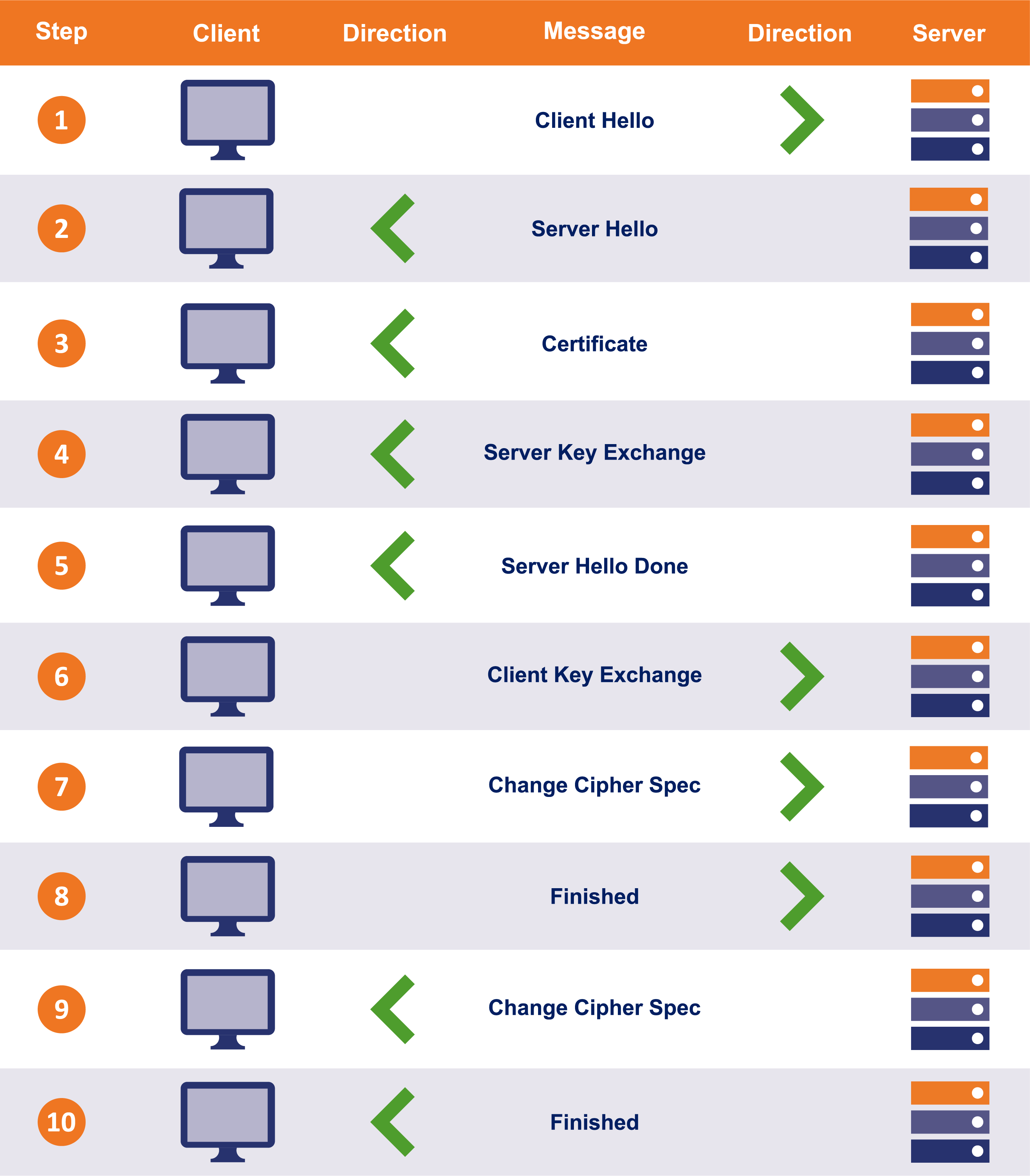
Step 1: The entire connection/handshake begins with the client sending a “client hello” message to the server. This message consists of cryptographic information such as supported protocols and supported CipherSuites. It’s also comprised of a random value or random byte string.
Step 2: In response to the client’s “client hello” message, server responds with “server hello” message. This message includes the CipherSuite that the server has chosen out of the ones offered by the client. The server also sends its certificate along with the session ID and another random value.
Step 3: Now the client verifies the certificate sent by the server. Once the verification is done, it sends a random byte string, also called “pre-master secret,” and encrypts it using the public key of server’s certificate.
Step 4: Once the server receives the pre-master secret, the client, and server both generate a master key along with session keys (ephemeral keys). These session keys will be used to symmetrically encrypt the data.
Step 5: Now the client sends a “Change Cipher Spec” message to the server to let it know that it’s going to switch to symmetric encryption with the help of session keys. Along with it, it also sends “Client Finished” message.
Step 6: In reply to the client’s “Change Cipher Spec” message, the server does the same and switches its security state to symmetric encryption. The server concludes the handshake by sending “server finished” message.
As you can see, it took two round-trips between the client and the server to complete the handshake. On average, this takes somewhere between 0.25 seconds to 0.5 seconds. However, it could take more depending on several factors. At first, half a second may not seem like a lot of time but remember; this is just the handshake, the data transfer hasn’t even started yet. When you compare the TTFB (time to the first byte) of HTTP and HTTPS sites, the TTFB of HTTPS site takes longer when compared to that of an HTTP site, especially when the site is running on HTTP/1.
TLS 1.3 handshake #
- The TLS 1.3 handshake process involves only one round-trip (1-RTT) as opposed to 2-RTT in TLS 1.2. This results in reduced latency.
- In some cases, TLS1.3 even allows 0-RTT (zero round trip) resumption for repeat connections.
- TLS 1.3 的握手不再支持静态的 RSA 密钥交换,这意味着必须使用带有前向安全的
Diffie-Hellman进行全面握手。
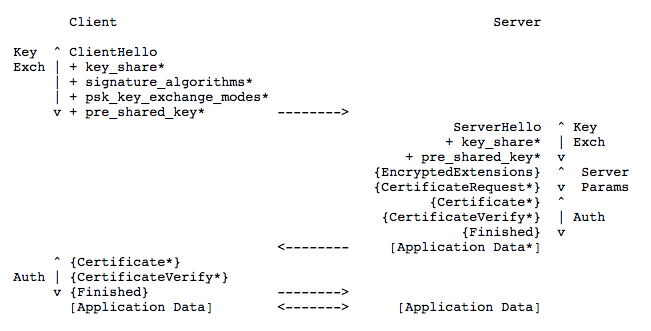
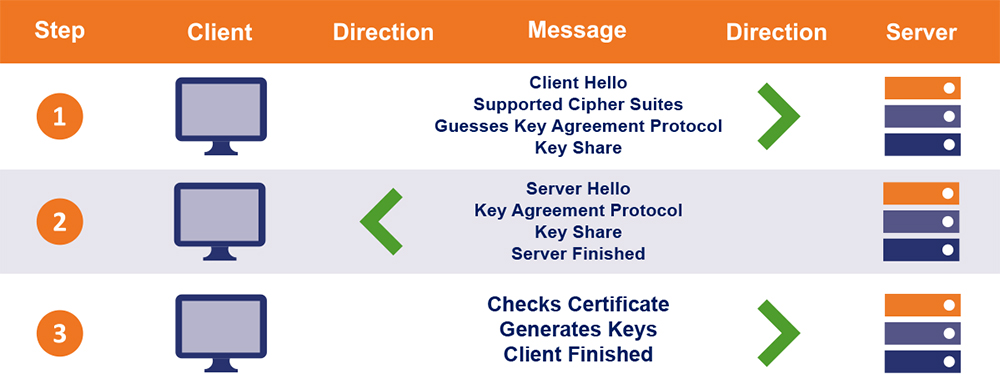
Step 1: “Client Hello”: The client sends the list of supported cypher suites and guesses which key agreement protocol the server is likely to select. The client also sends its key share for that particular key agreement protocol.
Step 2: “Server Hello”: the server replies with the key agreement protocol that it has chosen. The “Server Hello” message also comprises of the server’s key share, its certificate as well as the “Server Finished” message.
The “Server Finished” message, which was sent in the 6th step in TLS 1.2 handshake, is sent in the second step. Thereby, saving four steps and one round trip along the way.
Step 3: Now, the client checks the server certificate, generates keys as it has the key share of the server, and sends the “Client Finished” message. From here on, the encryption of the data begins.
This way, the TLS 1.3 handshake saves an entire round-trip (1-RTT) and hundreds of milliseconds. A major improvement over the TLS 1.2 handshake. You might be inclined to say that this makes no or very little difference, but no! In 2006, back when people had a thing called patience, Marissa Mayer revealed that a delay of half a second resulted in 20% traffic decline. Twenty Percent!!!
Handshake: The client and server will engage in a process called a “handshake” to establish a secure connection. During this process, the client and server agree on which version of SSL/TLS to use, and choose the cipher suites and cryptographic algorithms they will use to secure the communication.
Key Exchange: The client and server will perform a key exchange, a process by which they generate and securely share encryption keys. These keys will be used to encrypt and decrypt the data being transmitted between them.
Certificate Verification: The server will provide a digital certificate, which contains its public key and information about the server. The client checks the validity of the certificate by confirming that it was issued by a trusted Certificate Authority (CA) and has not expired.
Secure Communication: Once the handshake, key exchange, and certificate verification are complete, the client and server can begin securely transmitting data using the encryption keys they have shared.
![[0x001-CSCore/assets/7ccbd5f3fb90_57796345.png]]
1. “client hello"消息:客户端通过发送"client hello"消息向服务器发起握手请求,该消息包含了客户端所支持的TLS版本和密码组合供服务器选择,还有一个"client random"随机的字符串 2. “server hello"消息:服务器发送"server hello” 消息对客户端进行回应,该消息包含了数字证书,服务器选择的密码组合和"server random"随机字符串 3. 验证:客户端对服务器发来的证书进行验证,确保对方的合法身份 4. “Premaster secret” 字符串:客户端向服务器发送另一个随机字符串"premaster secret(预主密钥)",这个字符串是经过服务器公钥加密的,因此只有对应的私钥能解密。 5. 生成私钥:服务器使用私钥解密"premaster secret” 6. 生成共享密钥:客户端和服务端均使用client random ,server random和premaster scret,并通过相同的算法生成共享密钥KEY 7. 客户端就绪:客户端发送经过共享密钥KEY加密过的"finished"信号 8. 服务器就绪:服务器发送经过共享密钥KEY加密过的"finished"信号 9. 达成安全通信:握手完成,上方使用对称加密进行安全通信。
1. Client Hello #
The client initiates the SSL handshake to establish a secure connection with the server. The client sends a “ClientHello” message which includes the following information:
- 💙 Client Random: A client-generated random number (32-byte) used to generate the symmetric keys.
- 💙 Cipher Suites The client provides an ordered list of which cipher suites it will support for encryption. The list is in the order preferred by the client, with highest preference first. In TLS 1.3 the list of possible cipher suites has been greatly reduced. All the remaining suites are AEAD algorithms which provide stronger encryption guarantees than many previous suites with an easier all-in-one implementation.
- 💙 Extensions: Optional extensions supported by the client.
- Server Name: The client has provided the name of the server it is contacting, also known as SNI (Server Name Indication).
- Signature Algorithms
- Supported Versions
- PSKs (pre-shared keys) Exchange Modes
- Key Share: The client sends one or more ephemeral public keys using algorithm(s) that it thinks the server will support. This allows the rest of the handshake after the ClientHello and ServerHello messages to be encrypted, unlike previous protocol versions where the handshake was sent in the clear.
2. Server Hello #
The server receives the ClientHello message and responds with a ServerHello message containing:
- 💚 Server Random: A server-generated random number (32-byte) to be used in key generation.
- 💚 Cipher Suite The server has selected cipher suite 0x1302 (TLS_AES_256_GCM_SHA384) from the list of options given by the client.
- 💚 Extensions: Any extensions supported by server.
- Supported Versions: The server indicates the negotiated TLS version.
- Key Share: The server sends a public key using the algorithm of the public key sent by the client. Once this is sent encryption keys can be calculated and the rest of the handshake will be encrypted, unlike previous protocol versions where the handshake was sent in the clear.
3. Server Certificate Exchange #
SSL certificates contain a public key generated by the server and a digital signature signed with the private key of a trusted third party known as a certificate authority (CA). Most web browsers and operating systems come bundled with public keys from trusted CAs, which are used to verify that the CA issued the certificate. The server sends its digital certificate to the client so the client can authenticate the server.
The certificate contains:
- Server Public Key: Used by client to encrypt data to the server.
- Signature Algorithm: Algorithm used by the CA to sign the certificate.
- Validity Period: Start and end date between which the certificate is valid.
- Issuer Name: The CA that issued and signed the certificate.
- Subject Name: The server’s legal name and ownership details.
- Public Key Fingerprint: Hash of the public key to identify it.
The client will verify:
- The certificate is issued by a trusted CA.
- The certificate is valid and unexpired.
- The domain name matches the server’s domain.
If the checks pass, the server has been successfully authenticated.
4. Client Certificate Exchange #
If the server requests client authentication, the client sends its certificate following the same process the server did.
The client also generates a pre-master secret (48-byte random number), encrypts it with the server’s public key from its certificate, and sends it to the server.
5. Server Confirmation #
The server receives the pre-master secret. It decrypts it using its private key to obtain the pre-master secret.
The server then generates a hash of all the handshake messages exchanged so far. It encrypts this hash digest with the pre-master secret and sends it to the client.
This confirms the server was able to correctly decrypt the pre-master secret using its private key.
6. Session Keys Generation #
The premaster secret is used by both client and server to generate symmetric session keys that will secure the data transmission.
The client and server each generate two keys:
- Client Write Key: Encrypts data sent by client.
- Server Write Key: Encrypts data sent by server.
- Client Write MAC Key: Generates a MAC for data sent by client.
- Server Write MAC Key: Generates a MAC for data sent by server.
These keys are generated using the premaster secret, client and server random numbers, and handshake data through a Key Derivation Function (KDF).
7. Client Finish #
The client sends a Finish message that contains a hash and MAC of the handshake so far, encrypted with the client write key and client write MAC key.
This verifies the client was able to derive the symmetric keys successfully.
8. Server Finish #
The server sends its own Finish message containing the hash and MAC of the handshake, encrypted with the server’s write key and MAC key.
This verifies the server correctly calculated the session keys and is ready to start transmitting encrypted application data.
At this point, the SSL handshake is complete. The client and server can now use the established keys and encryption algorithm to secure the application layer data they transmit.
TLS证书认证 #
生成证书的配置文件 ca.conf 和 server.conf
ca.conf
[ req ]
default_bits       = 4096
distinguished_name = req_distinguished_name

[ req_distinguished_name ]
countryName                 = GB
countryName_default         = CN
stateOrProvinceName         = State or Province Name (full name)
stateOrProvinceName_default = GuangDong
localityName                = Locality Name (eg, city)
localityName_default        = Foshan
organizationName            = Organization Name (eg, company)
organizationName_default    = Step
commonName                  = Foshan
commonName_max              = 64
commonName_default          = Foshan
server.conf
[ req ]
default_bits       = 2048
distinguished_name = req_distinguished_name

[ req_distinguished_name ]
countryName                 = Country Name (2 letter code)
countryName_default         = CN
stateOrProvinceName         = State or Province Name (full name)
stateOrProvinceName_default = GuangDong
localityName                = Locality Name (eg, city)
localityName_default        = Foshan
organizationName            = Organization Name (eg, company)
organizationName_default    = Step
commonName                  = CommonName (e.g. server FQDN or YOUR name)
commonName_max              = 64
commonName_default          = Foshan

[ req_ext ]
subjectAltName = @alt_names

[alt_names]
DNS.1   = go-grpc-example #这里要指定好
IP      = 127.0.0.1
生成证书 #
生成CA根证书 #
1. 生成ca私钥,得到ca.key
openssl genrsa -out ca.key 40962. 生成ca证书签发请求,得到ca.csr
openssl req -new -sha256 -out ca.csr -key ca.key -config ca.confopenssl req:生成自签名证书,-new 指生成证书请求、-sha256 指使用 sha256 加密、-key 指定私钥文件、-x509 指输出证书、-days 3650 为有效期,-config 指定配置文件
3. 生成ca根证书,得到ca.crt
openssl x509 -req -days 3650 -in ca.csr -signkey ca.key -out ca.crt生成终端用户证书 #
1. 生成私钥,得到server.key
openssl genrsa -out server.key 4096- 生成证书签发请求,得到server.csr
openssl req -new -sha256 -out server.csr -key server.key -config server.conf- 用CA证书生成终端用户证书,得到server.crt
openssl x509 -req -days 3650 -CA ca.crt -CAkey ca.key -CAcreateserial -in server.csr -out server.pem -extensions req_ext -extfile server.conf