Review
- 2023-07-07 07:28
一、Introduction #
A domain name is a unique, easy-to-remember, human-readable address used to access websites, such as ‘google.com’, and ‘facebook.com’. Users can connect to websites using domain names thanks to the Domain Name System (DNS).
Any Internet-connected computer can be reached through a public
IP Address, either an IPv4 address (e.g. 173.194.121.32) or an IPv6 address (e.g., 2027:0da8:8b73:0000:0000:8a2e:0370:1337).
Computers can handle such addresses easily, but people have a hard time finding out who is running the server or what service the website offers. IP addresses are hard to remember and might change over time.
To solve all those problems we use human-readable addresses called domain names.
二、Deeper div #
2.1 Structure of domain names #
A domain name has a simple structure made of several parts (it might be one part only, two, three…), separated by dots and read from right to left:

Each of those parts provides specific information about the whole domain name.
TLD (Top-Level Domain) #
TLDs tell users the general purpose of the service behind the domain name. The most generic TLDs (.com, .org, .net) don’t require web services to meet any particular criteria, but some TLDs enforce stricter policies so it is clearer what their purpose is. For example:
- Local TLDs such as
.us,.fr, or.secan require the service to be provided in a given language or hosted in a certain country — they are supposed to indicate a resource in a particular language or country. - TLDs containing
.govare only allowed to be used by government departments. - The
.eduTLD is only for use by educational and academic institutions.
TLDs can contain special as well as latin characters. A TLD’s maximum length is 63 characters, although most are around 2–3.
The full list of TLDs is maintained by ICANN.
Label (or component) #
The labels are what follow the TLD. A label is a case-insensitive character sequence anywhere from one to sixty-three characters in length, containing only the letters A through Z, digits 0 through 9, and the ‘-’ character (which may not be the first or last character in the label). a, 97, and hello-strange-person-16-how-are-you are all examples of valid labels.
The label located right before the TLD is also called a Secondary Level Domain (SLD).
A domain name can have many labels (or components). It is not mandatory nor necessary to have 3 labels to form a domain name. For instance, www.inf.ed.ac.uk is a valid domain name. For any domain you control (e.g. mozilla.org), you can create “subdomains” with different content located at each, like developer.mozilla.org, iot.mozilla.org, or bugzilla.mozilla.org.
Finding an available domain name #
whois google.comDNS refreshing #
DNS databases are stored on every DNS server worldwide, and all these servers refer to a few special servers called “authoritative name servers” or “top-level DNS servers” — these are like the boss servers that manage the system.
Whenever your registrar creates or updates any information for a given domain, the information must be refreshed in every DNS database. Each DNS server that knows about a given domain stores the information for some time before it is automatically invalidated and then refreshed (the DNS server queries an authoritative server and fetches the updated information from it). Thus, it takes some time for DNS servers that know about this domain name to get the up-to-date information.
2.2 How does a DNS request work? #
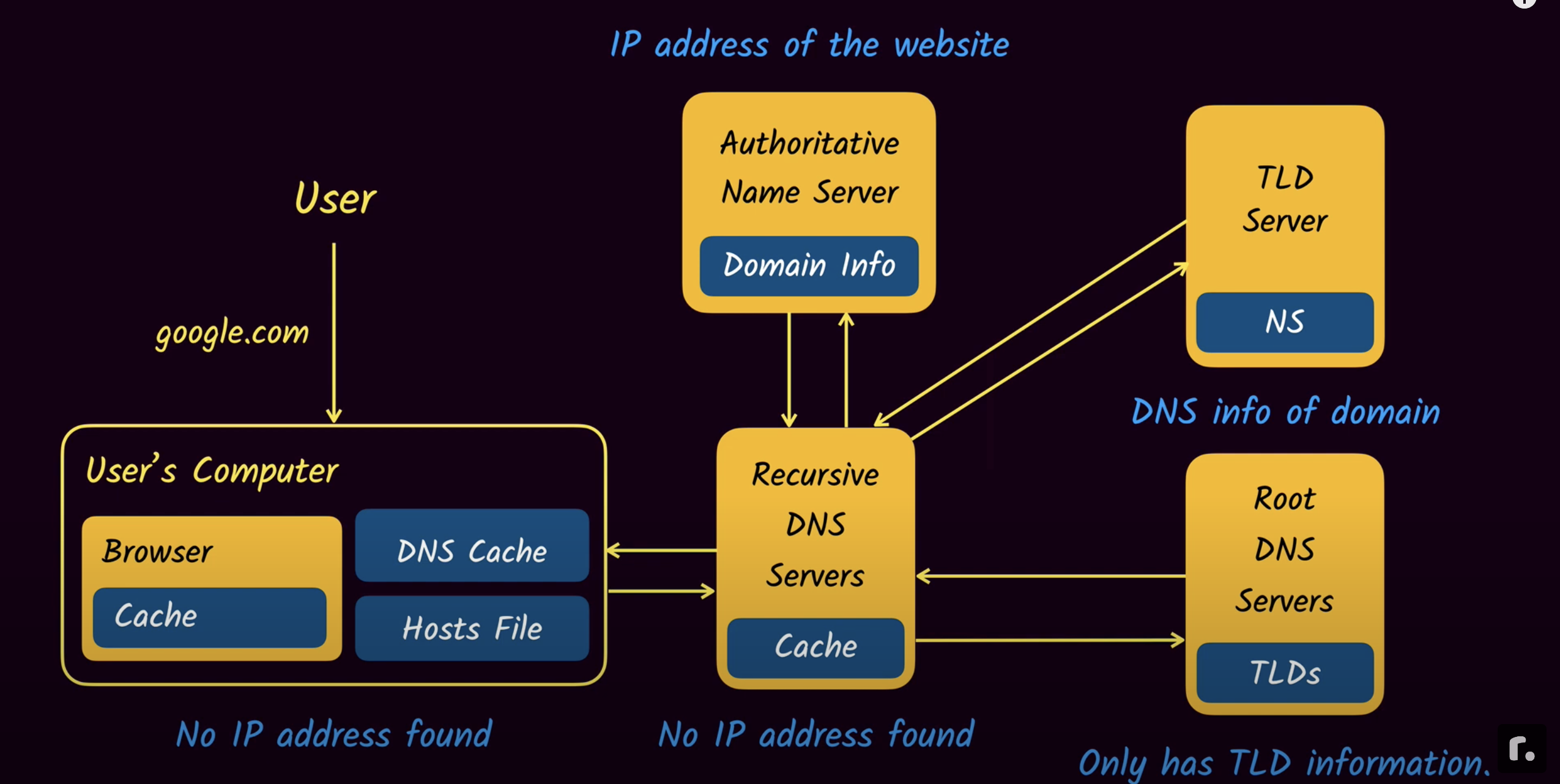 As we already saw, when you want to display a webpage in your browser it’s easier to type a domain name than an IP address. Let’s take a look at the process:
- Type
mozilla.orgin your browser’s location bar. - Your browser asks your computer if it already recognizes the IP address identified by this domain name (using a local DNS cache). If it does, the name is translated to the IP address and the browser negotiates contents with the web server. End of story.
- If your computer does not know which IP is behind the
mozilla.orgname, it goes on to ask a DNS server, whose job is precisely to tell your computer which IP address matches each registered domain name. - Now that the computer knows the requested IP address, your browser can negotiate contents with the web server.
DNS Record #
访问一个还没有配置Record的域名,会看到 “This site can’t be reached” Now, go to a website(visit-before) in your browser. You should get an error like “Server Not Found”, since we haven’t created the record yet.
Create a CNAME record with it and go to the website(visit-before) in your browser again. You should get the same “Server Not Found” error as before. Even if you force reload the page!
Why do I get a “server not found” error? #
Here’s what happens with “visit-after”, where everything’s working as expected
- You create the record
- Browser asks: where’s visit-after.jade157.messwithdns.com?
- DNS server responds: success!
With visit-before, it doesn’t work because of something DNS resolvers do called negative caching, where they cache the absence of a record.
- Browser: where’s visit-before.jade157.messwithdns.com?
- DNS server: doesn’t exist!
- DNS resolver: “oops it doesn’t exist! Better cache that!”
- DNS resolver: Doesn’t exist
- You create record
- Request: where’s visit-before.jade157.messwithdns.com?
- DNS resolver: “I saw this before!! It doesn’t exist!”
- DNS resolver: doesn’t exist
- You: :( :( :( IT EXISTS THOUGH
- You wait 1 hour and try again, everything works because the cache expired
DNS TTL #
Setting a very long TTL (like 10 days) makes your life very inconvenient: if you want to make a change, you need to wait up to 10 days for the change to happen! We’ll:
- Create a record with a short TTL, visit the page in our browser, change the record, and refresh the page. We’ll see the change!
- Create a record with a long TTL, visit the page in our browser, change the record, and refresh the page. We won’t see the change!
When the TTL is 30 seconds, the second time you make the request, the cache will have expired so you’ll get the new version. Here’s what that looks like in detail:
- You create a record
- Browser asks: where’s short-ttl.jade157.messwithdns.com?
- Resolver doesn’t have this in cache, so requests it
- DNS server responds: Here’s the IP! The TTL is 30 seconds!
- Resolver caches the IP for 30 seconds
- Resolver responds: Here’s the IP!
- … 30 seconds pass
- You update the record
- Browser asks: where’s short-ttl.jade157.messwithdns.com?
- Resolver notices that the cache expired, and requests it again
- DNS server responds: Here’s the IP!
- Resolver caches the IP for 30 seconds
- Resolver responds: Here’s the new IP!
And when the TTL is a big number like 10 days, the cache never expires, so you can’t get the updated site. Here’s what that looks like:
- You create a record
- Browser asks: where’s long-ttl.jade157.messwithdns.com?
- Resolver doesn’t have this in cache, so requests it
- DNS server responds: Here’s the IP! The TTL is 10 days!
- Resolver caches the IP for 10 days
- Resolver responds: Here’s the IP!
- … 30 seconds pass
- You update the record
- Browser asks: where’s long-ttl.jade157.messwithdns.com?
- Resolver responds: I have that cached! Here’s the IP!
| Terminology | Explain |
|---|---|
| A record | A very common type of DNS record. It contains an IPv4 address, like 1.2.3.4 |
| Authoritative DNS server | This is one type of DNS server. Every domain has an authoritative DNS server assigned to it. The way DNS requests generally flow is: you -> DNS resolver -> authoritative DNS server |
| CNAME record | A common type of DNS record. It contains an hostname address, like example.com.
CNAME records comic. |
| DNS name | Every time you type a domain, subdomain, or sub-sub-domain into your browser, that’s a DNS name! A DNS name (like bananas.prince.fruit.oops.pie.com.) has to:- be less than 255 characters - have less than 63 “ .“s in it- be composed of only a-z, A-Z, 0-9, and “-” characters - and a couple of other rules Other than that, DNS queries can contain any DNS name. |
| DNS record | When you make a DNS query, you get 0 or more records in response. Every record has at least 4 fields: the name, the TTL, the type, and one or more content fields. For example the IP address in an A record is its content. |
| DNS resolver | This is one type of DNS server. A resolver takes your request, sends it to the right authoritative DNS server, and caches the result. You might be using a resolver run by Google, Cloudflare, or your ISP. |
| DNS query | A DNS query is a request that you send to a DNS server. It contains 2 fields: the name (like example.com), and the type (like “A”). |
| Subdomain | See DNS name |
| TTL | Stands for Time To Live. This is a DNS record field. It’s an number of seconds. DNS resolvers use it to decide how long to cache the record. |